
B2B sales and e-commerce
Net prices in B2B sales: why net is the main number
In B2B sales, the headline number on a product should be the net price, because a buyer registered for VAT deducts the tax and their real cost is the amount before VAT. Gross and the VAT amount stay visible, but as supporting information, and gross only moves to the front at the amount to pay. In a retail store it's the other way round, because the consumer pays out of their own pocket and VAT is a cost to them. A store that shows a business gross first makes it convert every price and looks like a store built for consumers.
Why a B2B buyer counts in net
The net price is the price before VAT, the amount the seller keeps as revenue. The gross price is net plus VAT at the product's rate. For a VAT-registered company the tax is pass-through: it pays VAT to the supplier on purchase and then deducts it from the output VAT on its own sales (Art. 86(1) of the Polish VAT Act). The real cost of a purchase is therefore the net amount.
Buyers compare offers, calculate their own margin and plan budgets on net figures. If supplier A shows PLN 1,230 gross and supplier B shows PLN 1,000 net, at a 23% rate that is the same price. The buyer only sees it after converting, and with dozens of lines in an order, converting becomes a job of its own.
When net isn't the customer's whole cost
The "businesses count in net" rule has exceptions. They're worth knowing, because some of your customers may fall into them.
- VAT-exempt businesses. A business using the small-business exemption (Art. 113 of the VAT Act, from 1 January 2026 up to PLN 240,000 in annual sales) does not deduct VAT, so its cost is the gross price.
- Purchases with limited deduction. For some expenses a company deducts only part of the VAT, for example 50% on a car also used privately (Art. 86a of the VAT Act).
- Private individuals. If you also invite consumers to the store, they pay gross, and you have to show them the price including VAT. This follows from the Polish Act of 9 May 2014 on informing about prices of goods and services.
For these customers gross is the number they look at. That's why gross doesn't disappear from a B2B store; it moves to second place and is always shown next to net.
What this means in practice for a store
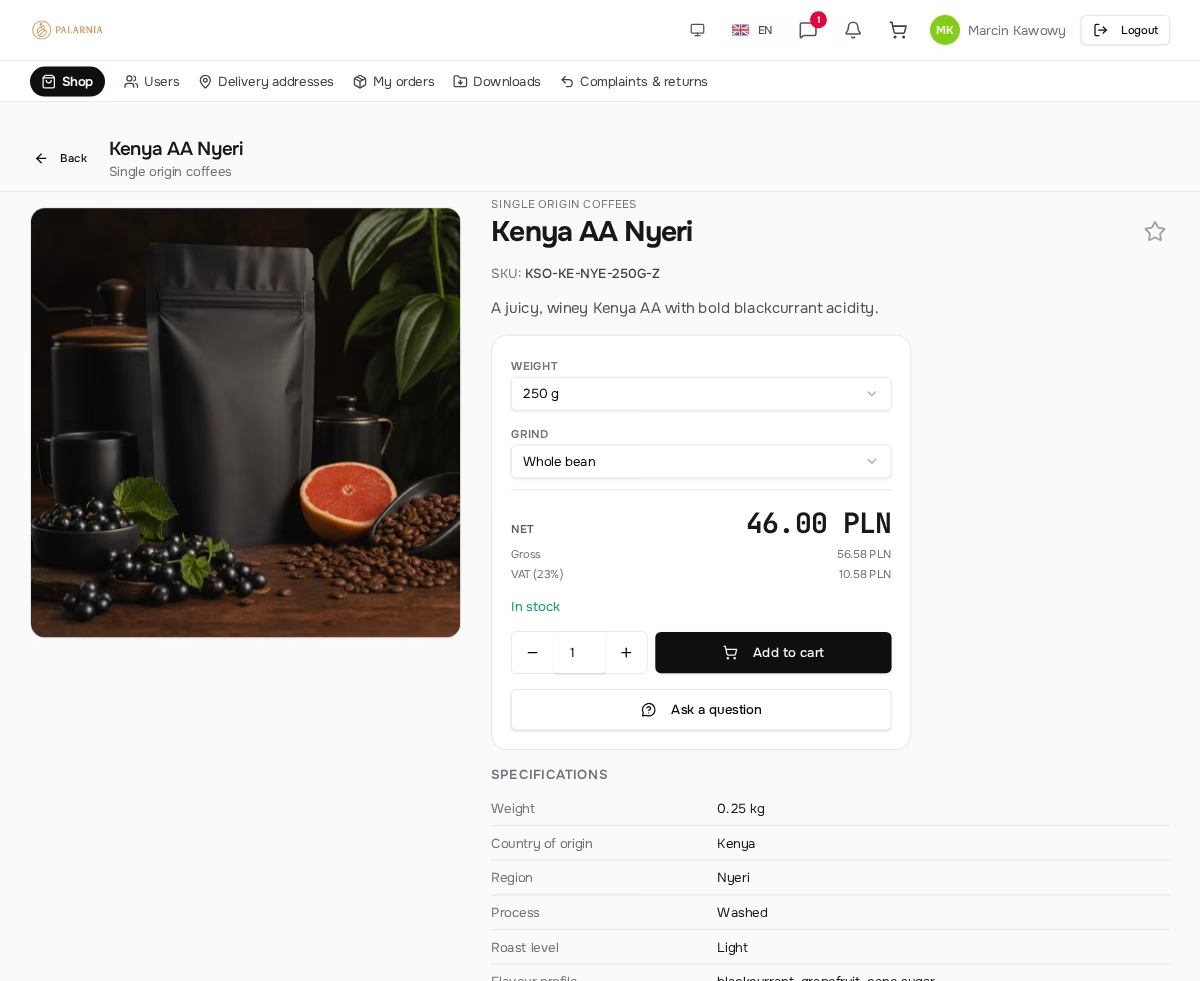
- Net as the main price on the product list and the product page.
- Gross and VAT as supporting information: visible, but smaller.
- An order summary with the net total and the gross total, so the customer's accounting team sees both amounts at once.
- The amount to pay in gross, because that's what the customer actually transfers.
The effect: the buyer immediately sees their real cost and doesn't reach for a calculator to work out the net figure.
Showing gross as the main price in a B2B store is like quoting a price in a different currency than the one the customer thinks in. It works, but every purchase requires translation.
Where a B2B store shows net and where gross
Not every amount in the store should be net. Below is the split vendispace uses, with the reasoning.
| Place | Main figure | Why |
|---|---|---|
| product list in a category | net, gross in smaller print | the buyer compares products in the amounts that will stay in their costs |
| product page | net; gross and VAT amount below | with 5%, 8% and 23% rates in one catalog, the VAT amount differs between products |
| customer's individual price | net (or a % discount) | the net amount is what gets negotiated; VAT is always added the same way |
| quantity tiers | net | a volume discount lowers the net price, and gross recalculates on its own |
| order summary | net total and gross total side by side | the customer's accounting needs both amounts |
| amount to pay | gross | that's what leaves the customer's account |
| invoice | lines with a net price and VAT rate | a VAT invoice shows the net value and tax separately for each rate |
Net, negotiations, discounts and order corrections
Net prices simplify price talks, because both sides negotiate the same number. In an individual price list you record a customer's deal as a percentage discount or a specific net price for a product. Quantity tiers work on net as well. The VAT rate belongs to the product, not to the deal with the customer, so gross always follows from net and never needs negotiating separately.
The same applies to corrections. When you change the quantity or the price of a line before payment, you work with net prices, and gross and VAT recalculate automatically. If the order hasn't gone into fulfilment yet, it goes back to the customer for approval. If it is already being fulfilled, the customer receives a notice of the change.
Fixed-amount discount codes are the exception. A customer understands a voucher for a set amount as money off the transfer, so vendispace treats it as a gross amount and spreads it proportionally across the VAT rates in the cart. A percentage code lowers net and gross by the same percentage, and the minimum cart value for a code is calculated on net.
Net and the invoice
Since sales are counted in net, the invoice has to be built from the same net prices and the same VAT rates as the order. A Polish VAT invoice shows the total net value and the tax amount separately for each rate (Art. 106e(1)(13) and (14) of the VAT Act). That's why lines retyped by hand into accounting software are the easiest way to end up with an order and a document that don't match.
In vendispace the invoice is created from the order through your inFakt or Fakturownia account: every line with its net price and VAT rate, plus shipping and a discount split across rates. Before you switch all your sales over, check on a test order that the amount to pay matches the invoice to the grosz, especially with large quantities of low-priced items, where rounding differences can add up. Since 2026 B2B invoices go through KSeF, which we cover in the article on KSeF and structured invoices.
Summary
- A VAT-registered buyer deducts the tax, so their cost is net, and net should be the main price in the catalog.
- Gross stays visible alongside it, because VAT-exempt businesses, purchases with partial deduction and consumers look at exactly that figure.
- Negotiations, individual prices, quantity tiers and order corrections are simplest on net. The exception is a fixed-amount voucher, which customers read as gross.
- The amount to pay is gross, and the invoice has to be built from the same net prices and VAT rates as the order.
Frequently asked questions
Does a B2B store have to show the gross price?
If you also sell to private individuals, yes: Polish rules on price information require a price including tax for consumers. In a store for businesses, net as the main figure is the norm, but showing gross next to it costs nothing and saves questions from VAT-exempt customers.
Does the customer pay net if prices are shown in net?
No. The customer transfers the gross amount, because VAT is part of the price the seller pays over to the tax office. Net is the basis for the price conversation, and the buyer recovers the VAT in their own settlement.
What about a VAT-exempt customer?
For them the cost is gross, so they compare offers on the amount including tax. That's why a B2B store should show gross next to every price, even in smaller print. The invoice for such a customer looks the same, because the VAT rate is set by what you sell, not by the buyer's status.
Is a percentage discount calculated on net or on gross?
The result is the same, because a percentage lowers both amounts in the same proportion. The difference appears with a fixed-amount discount: PLN 100 off net means PLN 123 less to pay at a 23% rate. That's why a fixed-amount voucher needs to state clearly whether it means net or gross.
How do I show prices when products have different VAT rates?
Each product has its own rate, and gross is calculated from net and that rate. With a mixed cart, the summary shows the net total and the gross total, and the invoice splits the tax by rate. The customer doesn't have to convert anything by hand, even with lines at 5%, 8% and 23% VAT in one order.
Should prices in euros be net too?
The principle is the same: a business buyer counts cost without tax, whatever the currency. When selling abroad, the VAT rate also depends on the type of transaction; for an intra-community supply of goods it can be 0%. That's a matter for your accountant, not a decision about how to display the price.
Net prices work best when every customer sees their own: in a closed, invitation-only B2B store the price list is tied to the logged-in company, and we explain how the order, invoice and payment connect into one flow in the article on B2B integrations. For an industry example, see how it works for a coffee roaster whose customers order from a net price list. Create a free account and see how your price list looks through the eyes of a B2B buyer.
Read also

Deferred payments in B2B without losing liquidity
Deferred payments in B2B without losing liquidity: the 60-day legal limit, VAT before payment, loans vs factoring vs buyer financing, and terms per customer.
Read article
Invitation-only B2B store — why a closed catalog sells better
Invitation-only B2B store: why a closed catalog sells better, how to invite a customer step by step, when it is the wrong choice and what it means for Google.
Read article
KSeF 2026: what changes in B2B sales and how to prepare
KSeF 2026 is already mandatory in B2B sales. Deadlines, invoice issue and receipt dates, penalties and KSeF numbers in transfers from 2027, and how to prepare.
Read articleStart selling B2B under your own brand.
Free FreeSpace account: add a product, invite a customer, take your first order. No card, no commitment.
Create a free accountHave a question? Write to us.