vendispace · B2B sales platform for the renewable energy sector

B2B sales
installers handle themselves.

A store under your brand with each customer's own prices, plus orders, invoices, deferred payments, shipping, CRM and documents in one flow. Renewable energy companies also get three calculators whose results go straight into the cart.

0 zł · no card · sector modules are enabled on your account manually

mounting system calculator RENEWABLES MODULE · DEMO
rows
3
panels per row
8
orientation

bill of materials
    net value of the kit
    Add the kit to the cart

    A demo of one of the modules: the same algorithm as in the system, run on a sample 1134 × 1722 × 30 mm panel, a 4400 mm rail and sample prices. In your store it runs on your catalogue and that customer's prices.

    sheet contents
    • a store under your brand
    • each customer's prices
    • catalogue and stock levels
    • orders
    • invoices
    • payments and deferred terms
    • shipping
    • CRM and chat
    • complaints and returns
    • file repository
    • renewables calculators
    01

    Today, your team
    is the platform.

    An installer calls to ask about availability and price. Someone on your side checks the warehouse, tries to remember this customer's discount, prepares a quote, retypes it into an order, then into an invoice, and a week later takes the call: "where's my parcel?"

    1. 07:40 · phone call

      "Have you got 30 450 W modules in stock? What's our price? And how many rails for three rows of eight?"

    2. 09:15 · quote

      A breakdown in Excel, prices from last season's price list, the customer's discount from memory.

    3. 11:02 · retyping

      The same items all over again: into the order, into the invoice, onto the shipping label.

    4. 15:20 · follow-ups

      "Where's the delivery?", "send the invoice again", "have you got the datasheet for this inverter?".

    All this time, your salesperson is shuttling the same data between the phone, a spreadsheet and accounting.

    02

    Platform first.
    Calculators are part of it.

    vendispace is a B2B sales system: a store under your brand, prices negotiated with each customer, orders, documents and communication in one flow. On top of that come sector-specific modules: for renewable energy companies, three calculators.

    A store under your brand

    Your logo, your categories, your welcome message and your address — a subdomain or a dedicated domain. Installers log in to your company's store and see only your offer and their own prices. One customer company can have many users.

    Each customer's price

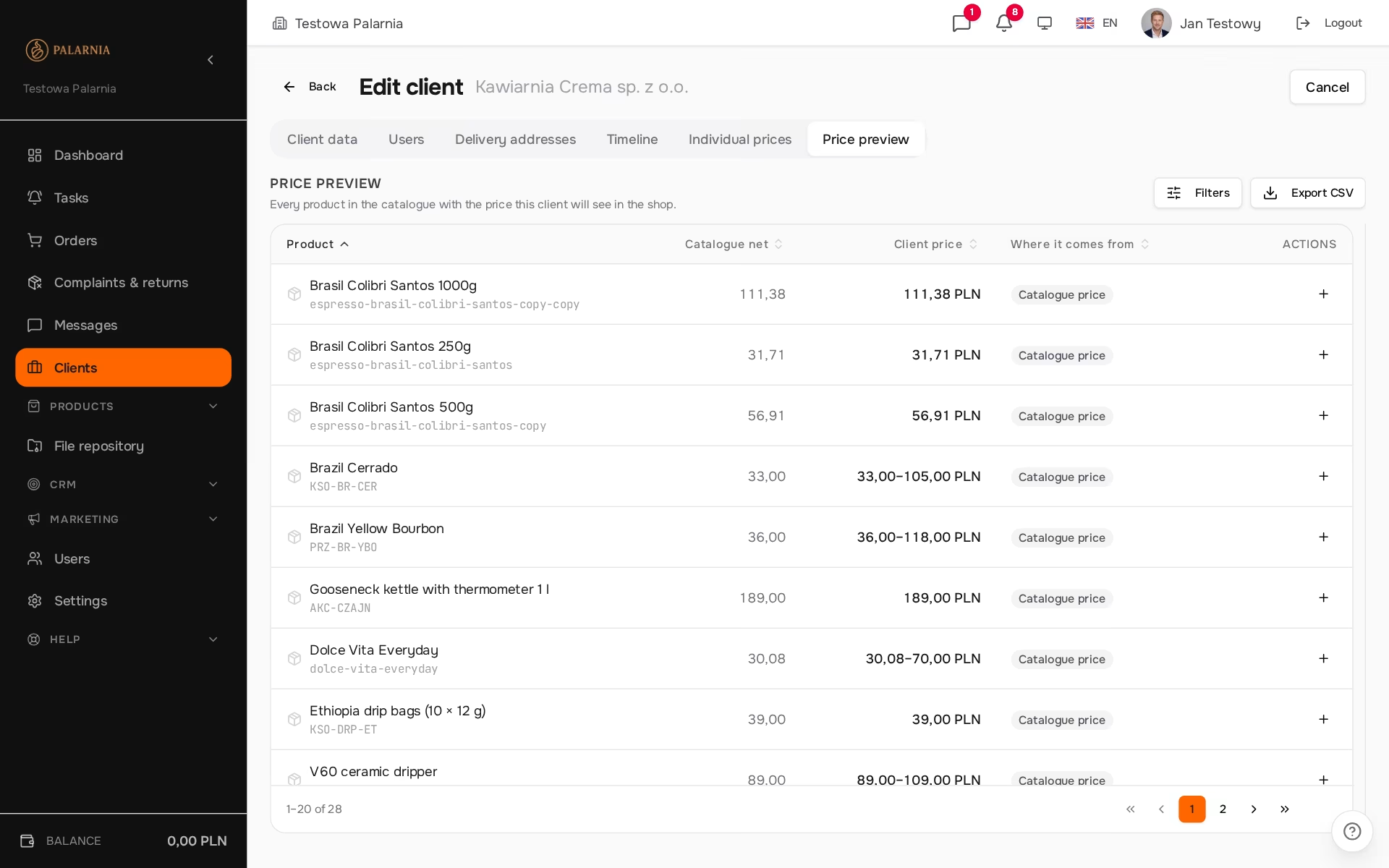
    Price groups and individual price lists. In the panel you can view the whole catalogue through a chosen customer's eyes — and see where every price comes from.

    A catalogue that describes the goods

    Categories with their own specification fields (power, voltage, efficiency), variants, stock levels and photos. Customers filter by parameters and see straight away how much of everything is left.

    Orders with history

    Order and payment statuses, numbering, change history, amount corrections and discount codes. It all sits on the order itself, so nobody has to dig through their inbox.

    Invoices without retyping

    The document is created with the order in your inFakt or Fakturownia account, and customer details are pulled by NIP (tax ID) from GUS. KSeF (Poland's e-invoicing system) stays with your accountants.

    Paid today, terms for the customer

    With PragmaPay, installers defer payment or pay in instalments at their own cost, and you receive the full amount straight away. Instant payments run through the gateway you already have.

    Shipping and labels

    The label and tracking number are generated in the panel, and the customer picks the parcel locker. InPost and Apaczka, and through Apaczka also DPD, DHL, FedEx and UPS.

    CRM, chat and mailboxes

    Leads on a board with your own stages, sales tasks, conversations pinned to a specific order and company mailboxes (IMAP, Gmail, Microsoft).

    Complaints and returns

    RMA requests with a return address, status workflow and refunds. Each request shows who promised an inverter replacement, and when.

    File repository

    Datasheets, certificates, installation manuals and declarations of conformity shared with customers — instead of sending the same PDFs for the hundredth time.


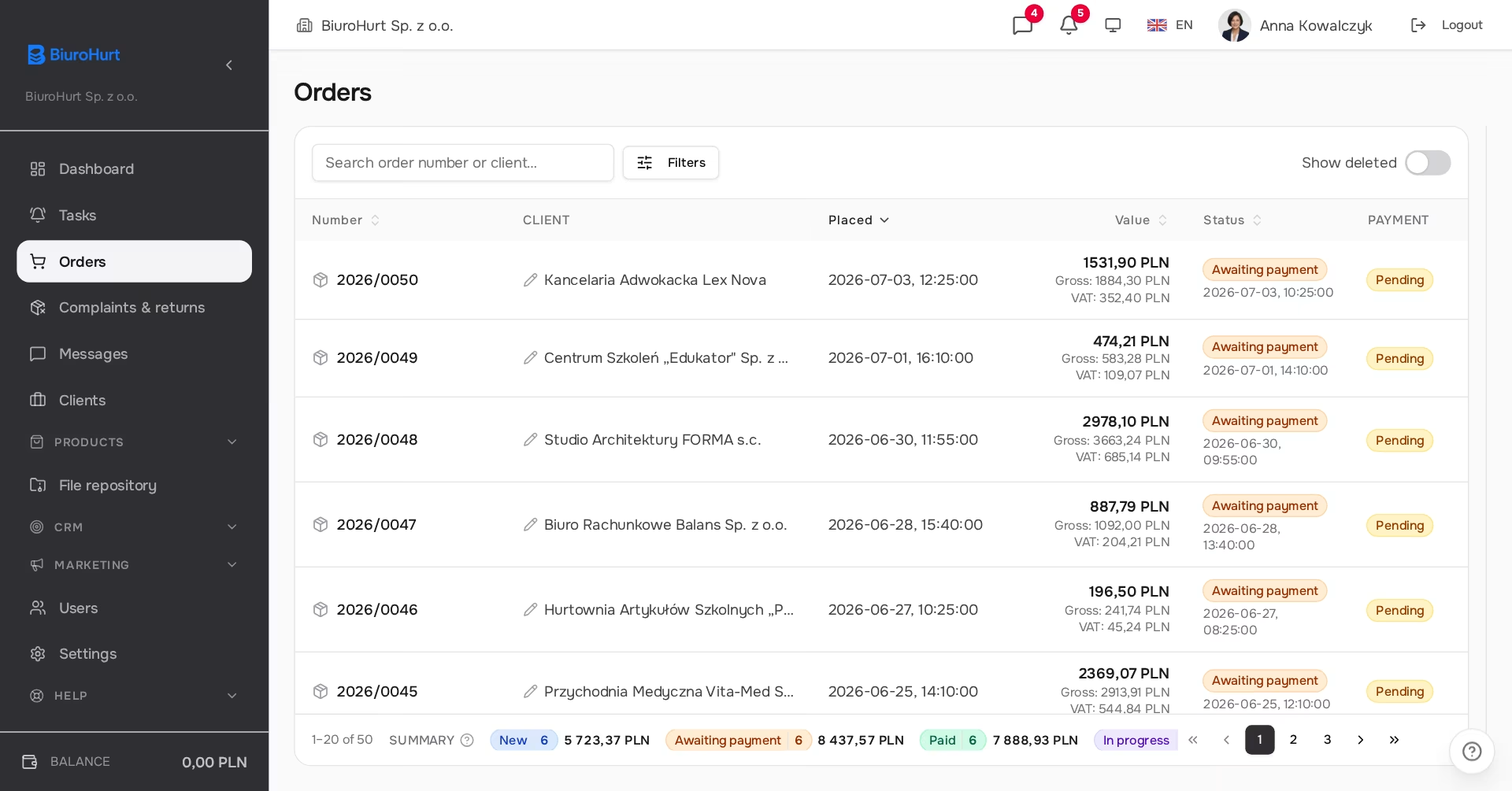
    vendispace.app/admin/orders
    Order list in the seller panel — order and payment statuses, net and gross amounts
    vendispace.app/admin/clients
    Customer price list preview in the panel — the whole catalogue with the price for the selected customer and the source of each price
    shop.yourcompany.com/shop
    Store header under the company's brand with the Calculators menu expanded
    shop.yourcompany.com/shop/products
    Renewable energy B2B store catalogue — panels, inverters, heat pumps and energy storage with net prices
    03

    Three calculators.
    One catalogue. Yours.

    We enable the calculators for renewable energy companies on top of the standard platform. The same algorithm runs in the company panel and in the customer's store, so your salesperson and the installer get the same result from the same data.

    01

    Panel
    mounting

    roof coverings
    8
    element types
    27
    rail choice
    by cost
    How the mounting calculator works

    A bill of materials instead of "how much of this do I need?"

    Panel rows, roof covering, mounting colour. The calculator picks clamps, rails, connectors, brackets and all the fittings, and the roof fixing is determined solely by the roof covering — on trapezoidal sheet there are no rails at all, because the panels go on bridge mounts.

    For every commercial rail length it calculates the kit separately and keeps the cheapest option: a different length means different offcuts and a different number of connectors. Panels are tagged as mounting elements in your catalogue, so their dimensions fill in automatically, straight from the product record.

    • ceramic and concrete tile, plain tile, metal roof tile, trapezoidal, corrugated and standing seam sheet, roofing felt and shingles
    • sandwich panels and insulated felt roofs deliberately left out — the covering manufacturer specifies the fixing
    • brackets always in even numbers, because they are fitted in pairs: one per rail
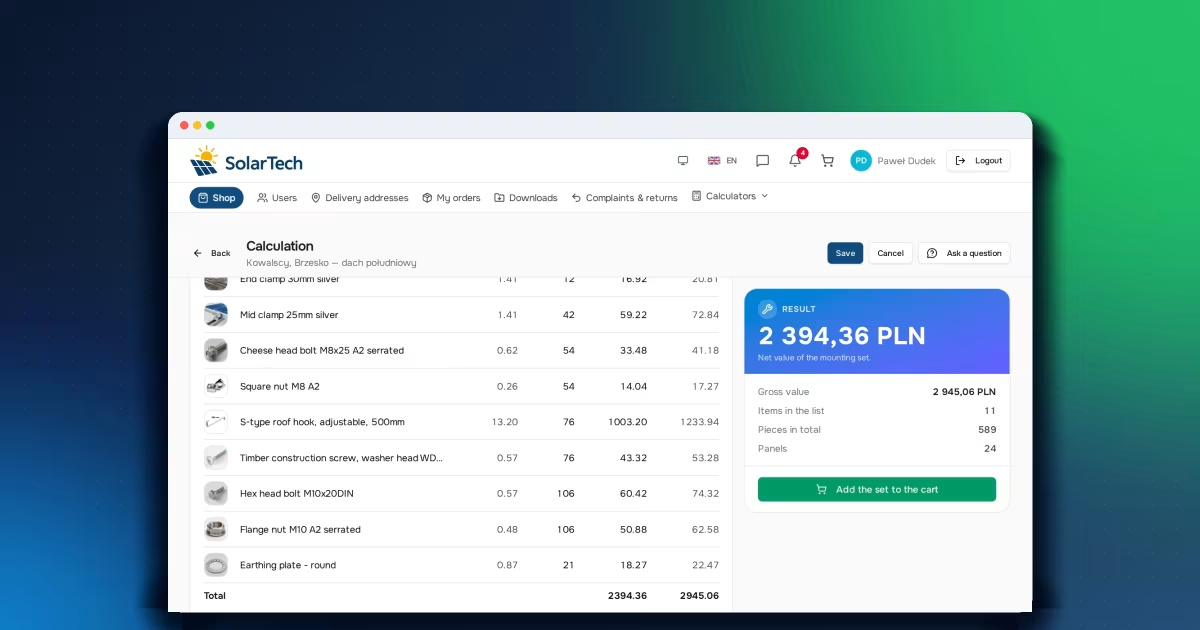
    shop.yourcompany.com/shop/mounting-calculator
    Mounting system calculator in the customer's store — panel rows and roof covering form next to the bill of materials
    choose by picture, not by name
    Expanded roof covering picker with thumbnails — ceramic tile, metal roof tile, trapezoidal sheet, standing seam
    a customer's saved calculations
    Saved calculations panel in the customer's store with the item being edited highlighted
    02

    Heat load
    demand

    input modes
    3
    adjustments
    12
    result
    kW · W/m² · class
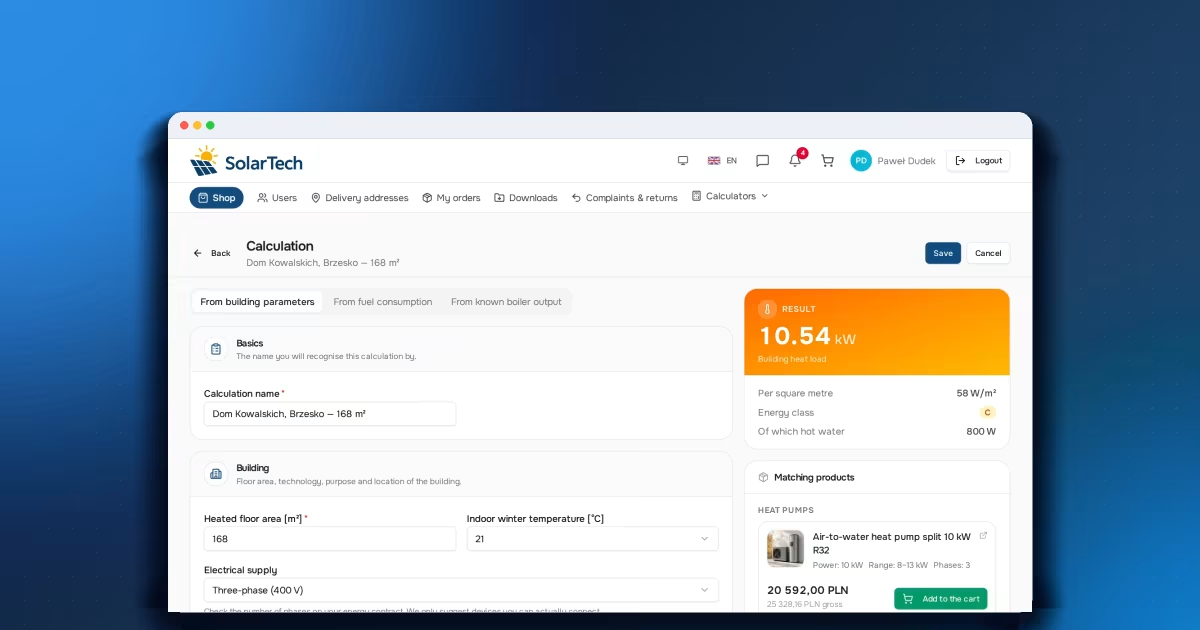
    How the heat load calculator works

    Three routes to the same number.

    From building parameters — wall material and thickness, wall, roof and floor insulation, windows, doors, climate zone, indoor temperature. Or more simply: from fuel consumption, or from the known boiler output when the customer is simply replacing the heat source.

    from building parametersW/m² = base load + adjustments
    from fuel consumptionW = consumption × calorific value × efficiency ÷ heating hours × 1000
    from known boiler outputW = boiler output [kW] × 1000

    Domestic hot water is added to the result (200 W per person), and finally the energy class — the argument installers use to sell a heat pump to the end customer.

    A+≤ 1 A≤ 15 B≤ 40 C≤ 70 D> 70

    energy class by index [W/m²] — the first threshold the result falls within

    shop.yourcompany.com/shop/heat-demand-calculator
    Heat load calculator — building parameters form and result card with the energy class
    climate zone map
    Expanded map of Poland's climate zones, divided into five zones
    03

    Energy
    demand

    input
    usage or bill
    efficiency
    matrix + exact angle
    result
    target output [kWp]
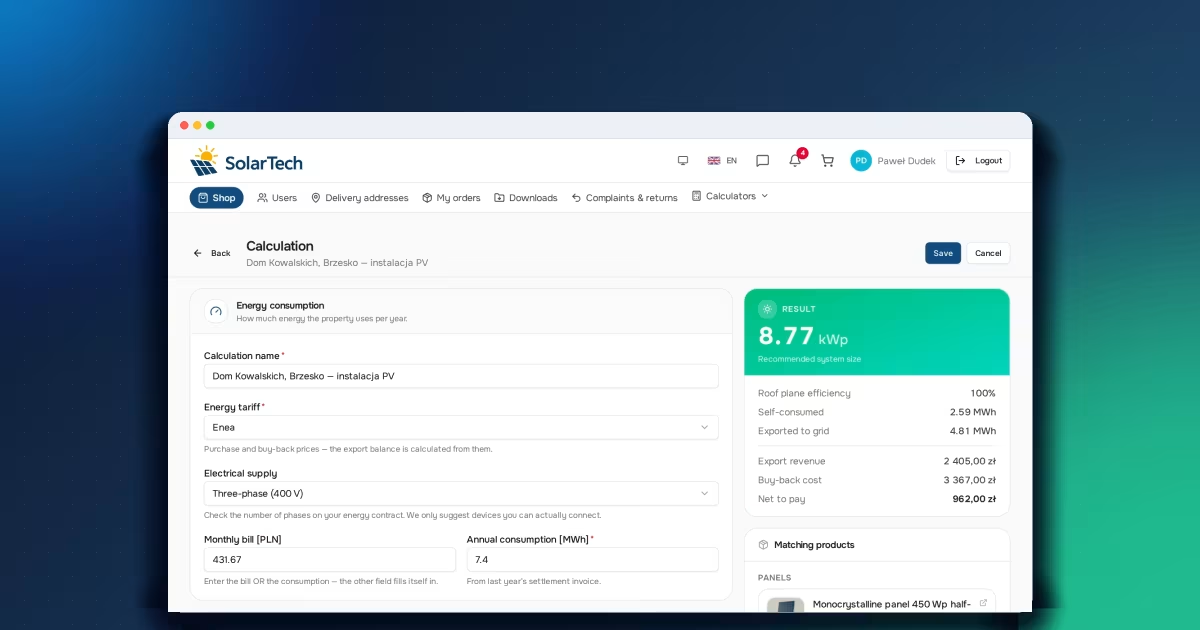
    How the energy calculator works

    System size calculated from the customer's bill.

    Customers enter what they know: annual usage in MWh or their monthly bill. The conversion works both ways. Roof pitch and orientation come in through an efficiency matrix, and in exact mode — through the real angle and azimuth.

    system efficiency [%] · roof pitch × orientation
    pitchSSESWE-W
    0–10°90929190
    11–25°98959488
    26–45°100969585
    60°93898775
    75°85817970
    90°71676757

    Target output isn't just usage divided by efficiency: the calculator also adds the energy the customer will buy back from the grid after the exported surplus is settled. Companies base their quotes on this number, so we carried it over down to the last operation.

    shop.yourcompany.com/shop/energy-demand-calculator
    Energy demand calculator — annual usage and tariff next to the result with the recommended system size and the balance of energy exported to the grid
    04

    One track
    for every order.

    Customers add goods straight from the catalogue or carry a kit over from a calculation, and from there everything follows the same path. Nobody retypes anything along the way, because the data never leaves the system.

    1. 01

      Catalogue or calculation

      The installer picks goods in your store or calculates a kit in the calculator.

    2. 02

      Cart

      This customer's individual prices, VAT from the product record, a discount code.

    3. 03

      Order

      Number, statuses, chat on the order, change history and documents.

    4. 04

      Invoice

      inFakt or Fakturownia, details by NIP from GUS — your account, not ours.

    5. 05

      Payment and shipping

      Gateway or deferred terms, InPost or Apaczka label, tracking number for the customer.

    One pricing engine

    The cart, the calculation and the price list preview in the panel all use the same engine. There's no second price list that could drift out of sync, so customers see the same price everywhere.

    Everything stays in the system

    Calculations are saved, orders have statuses, documents sit on the order. A customer comes back a week later, loads the calculation, tweaks one row and orders.

    Sales calculates, the customer orders

    In the panel a calculation is a quote, while the cart lives in the store, because the customer is the one who places the order.

    shop.yourcompany.com/shop/cart
    Store cart with items carried over from the mounting calculation at the customer's individual prices
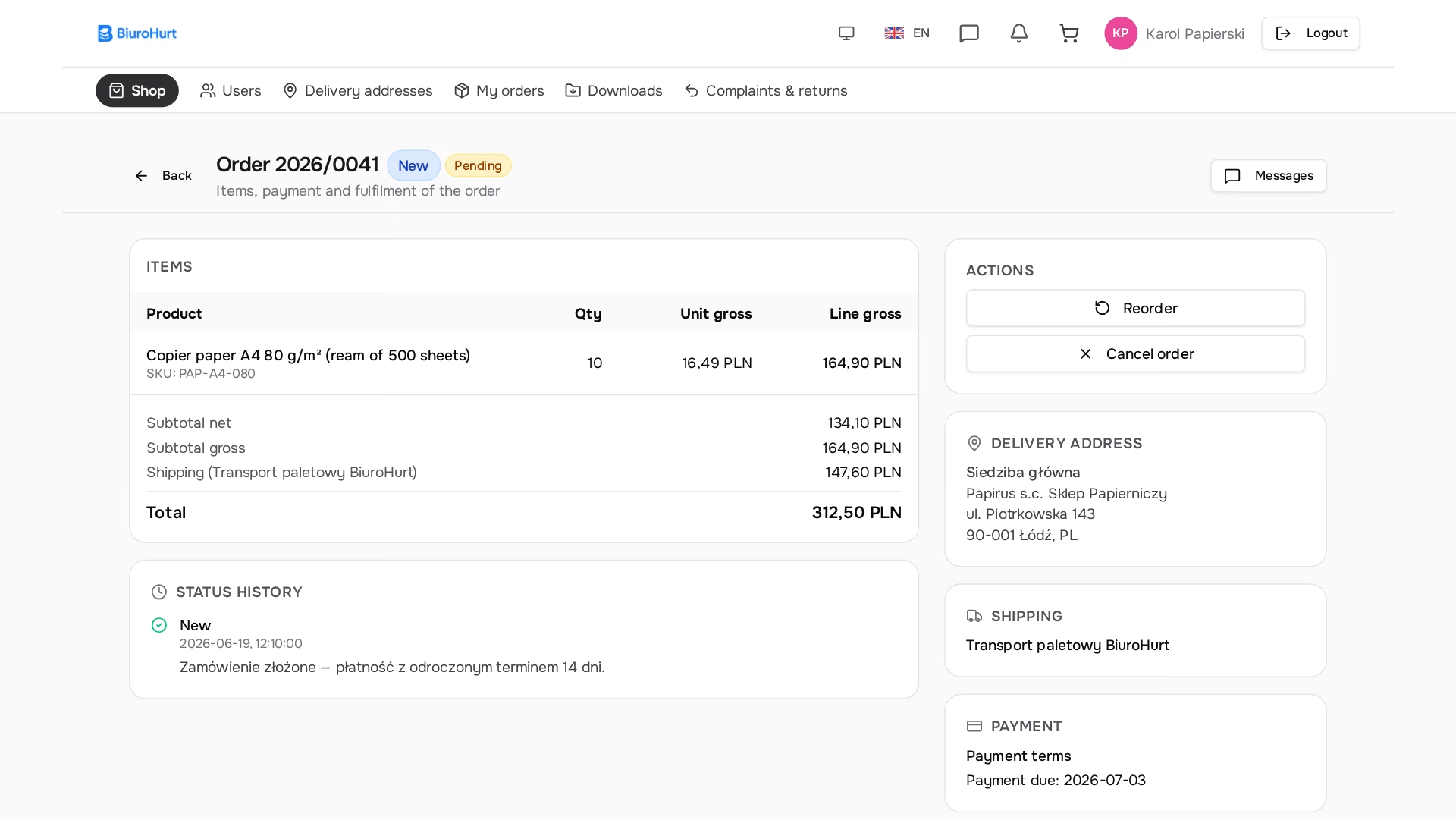
    shop.yourcompany.com/shop/orders/1042
    Order view in the customer store — items, status history and a deferred payment due date
    05

    The system is ready.
    You bring the catalogue.

    The store, price lists, orders, documents and integrations are on our side and work from your first login. The sector side adds data nobody should have to type in by hand: material coefficients, heat source efficiencies, fuel calorific values and climate zones.

    • 266dictionary entries
    • 130efficiency table rows
    • 59starter catalogue elements
    • 65preview images in selection lists
    • 96regression test cases
    on our side
    • store, catalogue, orders, invoices, payments, shipping and CRM — ready, no coding
    • integrations you connect with your own credentials: inFakt, Fakturownia, InPost, Apaczka, payment gateways
    • dictionaries of materials, insulation, windows, doors, fuels and climate zones
    • base load tables, the efficiency matrix and preview images for the options
    • regression tests on real quotes, run on every change
    on your side
    • products, prices and price groups — mounting elements too, since they are ordinary products of your company
    • the 59-element starter catalogue is imported with a single command and doesn't overwrite your prices
    • tagging panels in the catalogue so the calculator knows their dimensions
    • inviting installers to the store — company details are pulled by NIP from GUS
    vendispace.app/admin/mounting-calculator/elements
    Mounting elements catalogue in the company panel — products tagged with type, colour and dimensions
    06

    Every feature
    in every plan. You pay for scale.

    No separate fee for sector modules, invoices or shipping, and no commission on sales. Plans differ only in their limits on users, orders and file storage.

    start for free FreeSpace
    0 zł

    Launch your store and invite your first installer.

    • up to 3 users
    • 10 orders / mo
    • 1 GB of file storage
    • unlimited customers and products
    • SMS gateway
    • support: tickets
    Start for free
    FullSpace
    299 zł / mo

    When orders in your store start to grow.

    • up to 10 users
    • 100 orders / mo
    • 10 GB of file storage
    • unlimited customers and products
    • SMS gateway
    • support: tickets
    Choose as you grow
    ProfiSpace
    499 zł / mo

    No limits, with phone support.

    • unlimited users
    • unlimited orders
    • unlimited file storage
    • unlimited customers and products
    • SMS gateway
    • support: tickets and phone
    Choose as you grow

    net prices (23% VAT) · no commission on sales · every system feature in every plan

    setup

    We load your catalogue for you

    Send your price list and customer list in any format: PDF, Excel or Word. We'll configure the store, import categories and products, and set up the renewables sector and the mounting catalogue — so you log in to a ready-made account.

    • system configuration
    • import of categories and products
    • mounting elements catalogue
    • customer data
    800 zł net
    now 0 zł
    Request setup

    Offer for the FullSpace and ProfiSpace plans. We connect integrations once you share your credentials.

    07

    Questions asked
    before deciding.

    Is this a system just for renewables, or a regular B2B platform?

    It's a B2B sales platform: a store under your brand, each customer's prices, orders, invoices, payments, shipping, CRM and documents in one flow. Your company's sector only determines the add-on modules: for renewable energy companies, that means three calculators. Everything else works exactly as it does for wholesalers in any other sector.

    Will the store look like mine, or like someone else's platform?

    Like yours. Your logo, your categories, your welcome message and your address — a subdomain or a dedicated domain. Installers log in to your company's store and see only your offer and their own prices.

    Can we start with just the store, without the calculators?

    Yes, and that's usually how it starts. The store, price list and first customers work from day one; we switch on the calculators whenever you want — it's a toggle on our side, not a separate rollout.

    We have our own sizing spreadsheet in Excel. Why do we need another tool?

    Excel can work out a bill of materials, but it doesn't know this installer's price list or what's left in stock, and someone still has to retype the items into the system. Here, the calculation result lands in the cart as ready-made line items at this customer's prices.

    Does the calculator work on my catalogue, or on someone else's?

    On yours. Mounting elements are ordinary products of your company: they have your prices, VAT, stock levels and photos. The calculator only gets a few extra parameters (type, colour, dimensions, commercial rail length) that it uses to pick items. The 59-element starter catalogue is imported with a single command and doesn't overwrite prices on later updates.

    Will my customer see how you arrive at the result?

    They'll see the result and the bill of materials. They won't see the weightings or the calculation breakdown — that's the calculator's know-how. The gate sits in the API, not in the interface, so the details don't leak even in the server response.

    Where do the physical coefficients come from? Do we have to enter them?

    No. Wall materials, insulation, heat source efficiencies, fuel calorific values and climate zones are data shared across the whole market, so we maintain them centrally (266 dictionary entries and 130 efficiency table rows). You bring the catalogue, we bring the physics.

    Can an installer save a calculation and come back to it later?

    Yes. Every customer has their own list of calculations in the store: one click loads it into the form, the next save overwrites the same record, and "New calculation" starts from scratch. In the panel you see every customer's calculations — same data, same result.

    Which roof coverings does the mounting calculator support?

    Ceramic and concrete tiles (batten hook or rafter bracket), plain tiles, metal roof tiles, trapezoidal, corrugated and standing seam sheet, plus roofing felt and shingles. We deliberately don't calculate sandwich panels or insulated felt roofs: there the covering manufacturer specifies the fixing method, and a guessed bill of materials would mislead the customer.

    Have the results been verified?

    Each of the three calculators has a regression test suite (96 cases in total) covering every calculation branch and edge case. The tests run on every change to the algorithm or the dictionaries, so tweaking one coefficient can't quietly shift the result in another variant.

    How much does it cost? Are the calculators a paid add-on?

    There's no separate fee for the calculators and no commission on sales. You pay for a plan (FreeSpace 0 zł, FullSpace 299 zł, ProfiSpace 499 zł net/mo), and we enable the sector modules for renewable energy companies. Drop us a line after creating your account — we set your sector and the calculators appear in the panel and in the store.

    How do we get started?

    You create a free account, we set your sector to renewable energy, you import the mounting catalogue with a single command and tag your panels (their dimensions fill into the calculator automatically). We can load your price list and customer list for you — see setup below.

    end of sheet

    Run it
    on your own catalogue.

    Create a free account, set up your store and invite your first installer. We'll switch on the calculators whenever you need them — just drop us a line.

    0 zł · no card · FreeSpace with no time limit